 Updated: Feb. 28 2026 | Created: Feb. 28 2026
What Is a URL? (Uniform Resource Locator)
A Uniform Resource Locator (URL) is the complete web address used to locate and access resources on the internet. A URL tells your browser exactly where a resource is located and how to retrieve it.
Resources can include web pages, images, videos, downloadable files, APIs, and more. In simple terms, a URL is the web address you type in your browser’s address bar to visit a website or open a specific page.
Quick Definition: A URL (Uniform Resource Locator) is the address used to access a specific resource on the internet.
Why Are URLs Important?
URLs are essential because they provide a precise way to locate and access resources on a network. Think of a URL like a home address. Without it, browsers would not know where to send requests, and users would not know how to find websites or specific pages.
URLs also:
- Help search engines index web pages
- Enable linking between pages
- Allow sharing of exact resources
- Support dynamic content with query parameters
Types of URLs
URLs can be categorized in different ways depending on their location, structure, or protocol.
1. Based on Location
- Localhost URL – Accesses resources on your own computer or local network, mainly used by developers during testing.
Example:
http://127.0.0.1:5000 - Remote Host URL – Accesses resources hosted on a server connected to the internet.
Example:
https://www.google.com
2. Based on Structure
- Absolute URL – A complete web address including protocol and domain.
Example:
https://computergeek.dev/what-is-a-url - Relative URL – A partial address that depends on the current page’s location.
Example:
/what-is-a-url
3. Based on Protocol
- HTTP – Standard protocol for web pages.
- HTTPS – Secure version of HTTP that encrypts data.
- FTP – Used to transfer files between computers.
- Mailto – Opens the default email client for sending emails.
- File – Points to local files on your computer.
Parts of a URL
A URL is made up of several components. Understanding each part is key to navigating and building the web.
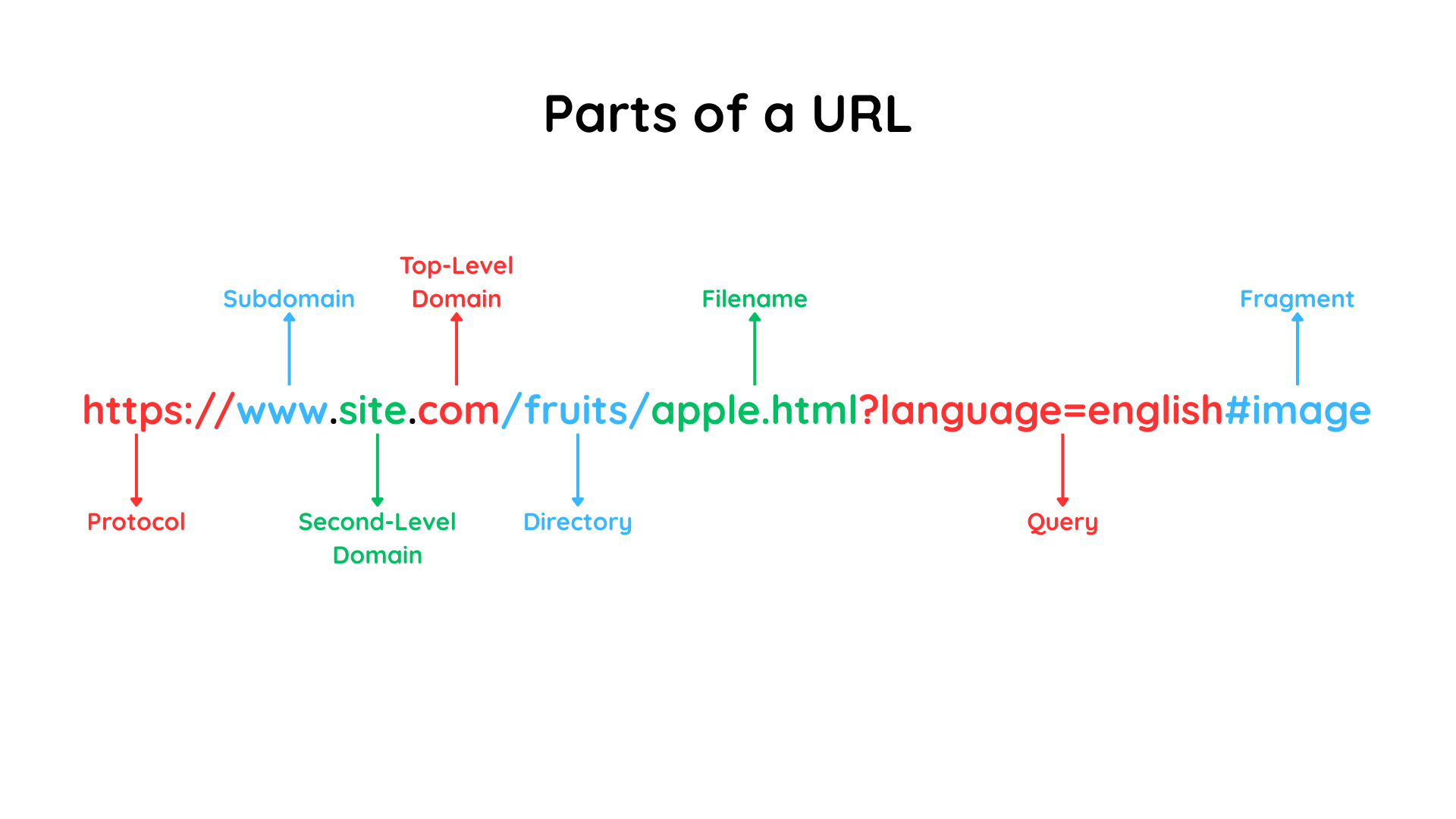
1. Protocol (Scheme)
Defines the rules for transferring data between the browser and server.
Examples: https, http, ftp, mailto, file
2. Subdomain
Organizes different sections of a website, appearing before the main domain.
Examples:
www.example.comblog.example.comapi.example.com
3. Domain
The main website name that acts as a human-readable version of an IP address.
Examples:
google.comphp.netcomputergeek.dev
4. Path
Specifies a specific file or location on the server.
Examples:
//docs/docs/what-is-a-url.html
5. Query Parameters
Start with a question mark (?) and pass data to the server as key-value pairs.
Examples:
?q=what+is+a+url?device=mobile&language=english
6. Fragment
Starts with a hash (#) and points to a specific section of a webpage.
Examples:
#definition#examples#how-it-works
URL vs URI vs URN
- URI (Uniform Resource Identifier) – Broad term that identifies a resource.
- URL – A type of URI that tells you how to locate a resource.
- URN (Uniform Resource Name) – Identifies a resource by name, not location.
In short: All URLs are URIs, but not all URIs are URLs.
Absolute URL vs Relative URL
Absolute URL
A complete address including protocol and domain.
Example: https://computergeek.dev/what-is-a-url
Relative URL
A partial address depending on the current page’s location.
Example: /what-is-a-url
How a URL Works
When you enter a URL in your browser:
- The browser reads the URL and identifies the protocol (HTTP/HTTPS).
- It performs a DNS lookup to convert the domain name into an IP address.
- A connection is established with the server using TCP.
- The browser sends an HTTP/HTTPS request for the resource.
-
The server responds:
-
200 OKif successful 404 Not Foundif the resource is missing- The browser renders the response into a web page you can see and interact with.
Examples of URLs
Remote Host URL
https://www.google.com
Remote Host URL with Path
https://www.google.com/search
Remote Host URL with Query Parameters
https://www.google.com/search?q=what+is+url
Remote Host URL with Fragment
https://www.google.com/search?q=what+is+url#page2
Localhost URL
http://127.0.0.1:5000
Localhost URL with Path
http://127.0.0.1:5000/search
Localhost URL with Query Parameters
http://127.0.0.1:5000/search?q=what+is+url
Localhost URL with Fragment
http://127.0.0.1:5000/search?q=what+is+url#page2
Common URL Mistakes
- Missing
httpsfor secure websites - Broken links due to typos
- Incorrect query parameters
- Ignoring case sensitivity in URLs
- Using overly complex or unreadable URLs
Conclusion
Understanding URLs is fundamental to navigating the web, developing websites, and sharing resources online. By knowing the structure, types, and how URLs work, you can improve your web development skills, SEO knowledge, and overall internet literacy.